Robots.txt Rules for AI Crawlers
Twelve bots, what each vendor says, and files you can copy.

Knowing how to create an llms.txt file takes about thirty minutes and five steps. An llms.txt file is a plain Markdown page at the root of a site that gives AI agents a short, curated map of the pages worth reading. Choose the pages, write a summary, group the links, save the file at /llms.txt and test it. OpenAI, Anthropic and Google publish one for their developer docs. Whether any AI system reads yours is a separate question, and the dated sources below answer it.
The llms.txt proposal asks websites to publish a Markdown file at /llms.txt that offers brief background, guidance and links to the detailed pages a language model should read. Jeremy Howard first published it on 3 September 2024, and the current page is a second version, last modified on 10 August 2026.
The file can sit at the site root or at any path inside it. A file at /docs/llms.txt covers the pages under /docs/, and where more than one file applies, agents are expected to use the most specific one.
The idea behind it is simple. A web page is built for people, so its useful text is wrapped in navigation, scripts and ads. A model that has to answer a question wants the useful text and a short list of where to find more. An llms.txt file is that list, written by the person who knows the site best.
The format is Markdown with a fixed order. Only the first item is required.
The example below is a made-up shop, Acme Supply, written to that format.
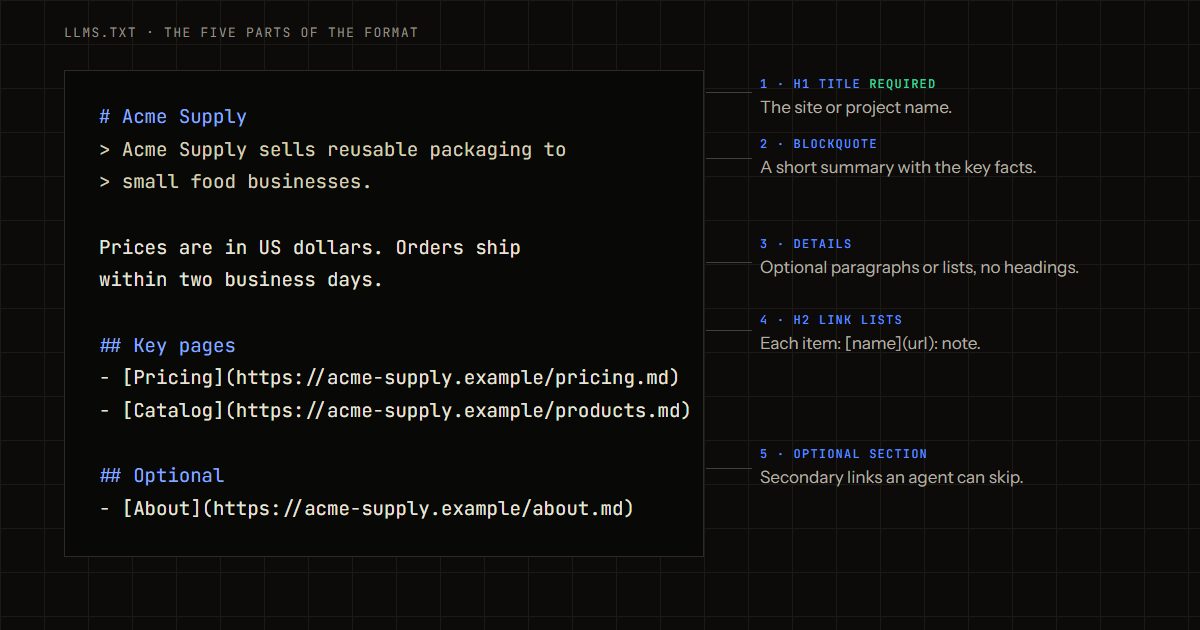
# Acme Supply

> Acme Supply sells reusable packaging to small food businesses. This file lists the pages needed to answer questions about products, prices and shipping.

Prices are in US dollars. Orders ship within two business days.

## Key pages

- [Pricing](https://acme-supply.example/pricing.md): Plans and volume discounts
- [Product catalog](https://acme-supply.example/products.md): Every container, lid and bag
- [Shipping and returns](https://acme-supply.example/shipping.md): Delivery times and return rules

## Optional

- [About Acme Supply](https://acme-supply.example/about.md)
- [Packaging guides](https://acme-supply.example/blog.md): Guides on food packaging rules
Real files follow the same shape at larger scale. The OpenAI API docs file opens with an H1, a one-line blockquote and a note that each entry has a Markdown twin. Stripe’s file opens with a blockquote about the company and then lists pages under headings such as Payments. Cloudflare’s file links to one llms.txt file per product.
List the pages that answer the questions a customer or an agent asks most often. For a shop that means pricing, the product catalog, shipping, returns and contact. For a software product it means the docs home, the quick start, the API reference and the changelog.
The proposal says the file should stay small enough to fit in context, with the detail behind the links. It gives no page count. A list of 10 to 25 links is a workable range for most sites, and a short file beats a complete one.
Use the site name as the H1. Write the summary as a blockquote of one or two sentences that state what the business does, who it serves and where. Use plain words, because the proposal asks for concise, clear language and for jargon to be explained or left out.
A good summary can be read on its own. If an agent stopped after the blockquote, it should still know what the site is.
Split the links into a few sections with names a reader would recognize, such as Docs, Products or Policies. Write each item as a link followed by a short note that says what the page contains. The note matters more than the title, because it tells an agent whether to open the page.
Put secondary pages under an H2 named Optional. The proposal reserves that name for links an agent can skip when it is short on space.
The proposal recommends a clean Markdown copy of each page at the same URL with .md added, for example /pricing.md. OpenAI’s file takes that route. Stripe’s file links to its normal HTML pages instead, which also works.
If Markdown copies do not exist yet, link the normal pages. If they do exist, link those. The markdown versions check explains how to produce them.
Save the file as llms.txt in the root of the site so that https://yourdomain.com/llms.txt returns it. Documentation can have its own file at /docs/llms.txt.
Then run the test the proposal suggests: ask an AI agent questions about your site while giving it only the llms.txt file as a starting point. If it cannot find the pricing page, the notes need work. Also confirm the file loads without an error. Chrome’s Lighthouse reports a server error on the file, and treats a plain 404 as not applicable.
Writing the file by hand is fine, and several tools generate one. The proposal lists the WordPress plugins Yoast SEO and AIOSEO, Wix, the documentation platforms Mintlify and GitBook, and plugins for Docusaurus and VitePress. The free llms.txt generator from LLMReady builds the file in the browser from a list of pages.
The answer depends on whom you ask, and the sources disagree in tone. This table lists what each one says, with its date. Every page was opened on 1 November 2026.
| Source | What it says | Date |
|---|---|---|
| llmstxt.org | Thousands of sites publish an llms.txt file, documentation platforms generate it, Chrome’s Lighthouse audits for it, and OpenAI, Anthropic and Gemini publish one for their developer docs | Page modified 10 Aug 2026 |
| Google’s John Mueller on Bluesky | “FWIW no AI system currently uses llms.txt.” | 17 Jun 2025 |
| Google’s John Mueller on Reddit | Called the file speculative for now, because none of the AI systems use it | Reported 2 Jun 2026 |
| Google Search Central | No new machine readable files, AI text files or markup are needed to appear in AI Overviews or AI Mode | Read 1 Nov 2026 |
| Chrome Lighthouse | Calls it an emerging convention. A missing file is marked not applicable because the file is optional at the moment | Page updated 5 May 2026 |
| OpenAI, Anthropic and Perplexity crawler pages | No llms.txt directive for their crawlers. OpenAI’s page only points to its own docs index | Read 1 Nov 2026 |
Three readings follow from the table.
For most sites it is a small, cheap job with a modest and uncertain return. Build one when any of these is true:
Skip the file as a ranking tactic. The same thirty minutes spent on crawler access, a correct sitemap and pages that load their text without scripts will do more for how machines read a site.
The three files do different jobs, and none replaces another.
| File | Job | Written for |
|---|---|---|
| robots.txt | States what automated tools may access | Crawlers, before they fetch pages |
| sitemap.xml | Lists every indexable page | Search engines |
| llms.txt | Offers a curated overview with links to the best pages | Agents and models, when they need information on a topic |
The proposal makes the same split. A sitemap often lacks the machine-readable versions of pages, leaves out external links and covers far more than fits into a context window. The proposal says an llms.txt file can complement robots.txt by providing context for the content that robots.txt allows, so the crawler rules come first.
No. Google says AI features need no extra files, and Chrome calls the file optional. It is worth adding when agents are likely to read your documentation or product pages, and the cost is low.
Put it at the root, so that https://yourdomain.com/llms.txt returns it. The proposal also allows a file at any path, such as /docs/llms.txt, which covers the pages under that path.
Neither. Access rules live in robots.txt. The llms.txt file only describes the content that is available. See the guide to robots.txt rules for AI crawlers for the allow and block lines.
No source opened for this guide says so. OpenAI’s crawler page mentions llms.txt only as the index of its own docs. Whether a page can appear in ChatGPT search depends on OAI-SearchBot being allowed in robots.txt, and on the page itself.
Open the free llms.txt generator, paste your key pages in the form Title, URL and note, and copy the finished file. Save it at the root of the site and run the test from step 5. Now that you know how to create an llms.txt file, the generator removes the typing. LLMReady also checks that the file loads, that its links resolve and that it sits beside Markdown copies of your pages, as described in the llms.txt check. Join the beta list at LLMReady early access to see that report for your own site.
Leave your email and you will hear when your spot is ready.