How to Create an llms.txt File
The format, a worked example and what is known about who reads it.

A search engine indexes a page. A training crawler copies it for a model. A user-request fetcher opens it because a person asked. Robots.txt rules for AI crawlers have to treat those three jobs differently, and the vendors’ own pages show that they behave differently. Allow the search bots to stay in AI answers, treat the training bots as a business decision, and expect that some user fetchers may ignore robots.txt. Below are 12 bots checked against each vendor’s page on 1 November 2026, three copy-paste files and a script that tests the result.
Twelve bots from seven organizations cover the common cases. They fall into three groups, and the group matters more than the brand.
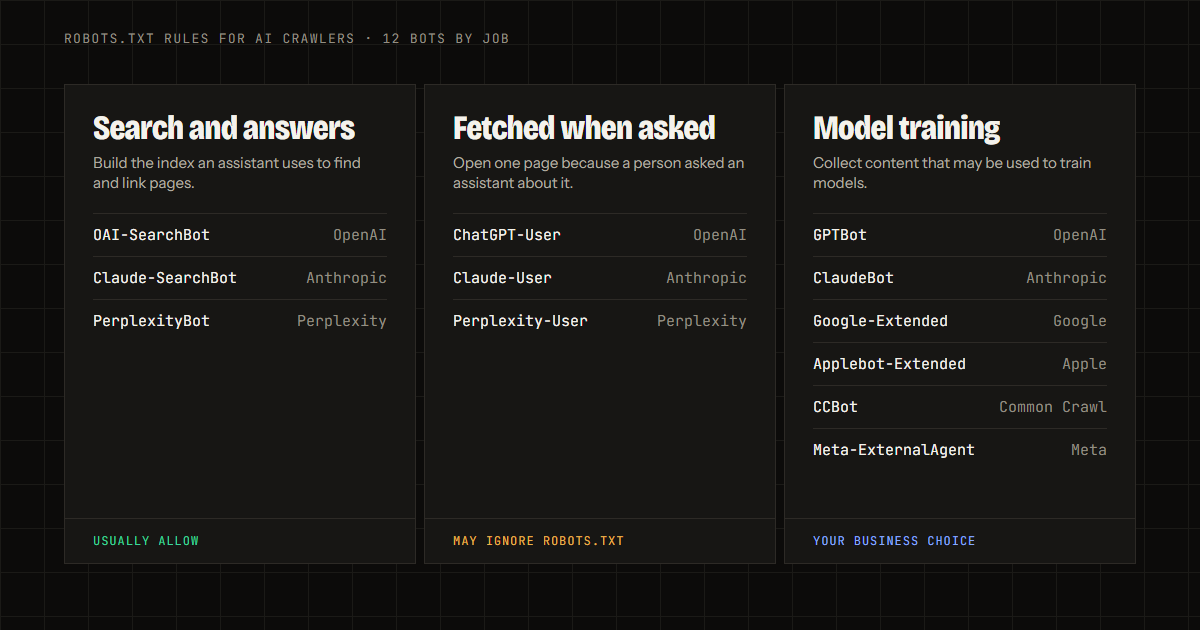
The table paraphrases what each vendor says on its own page. The sources are linked under it.
| Bot | Company | Job | What the vendor page says |
|---|---|---|---|
| OAI-SearchBot | OpenAI | Search | Surfaces sites in ChatGPT search. Sites opted out will not be shown in ChatGPT search answers, though they can still appear as navigational links. OpenAI recommends allowing it |
| Claude-SearchBot | Anthropic | Search | Improves search result quality. Disabling it prevents indexing for search optimization, which may reduce visibility in search results |
| PerplexityBot | Perplexity | Search | Surfaces and links sites in Perplexity results. Not used to crawl content for AI foundation models |
| ChatGPT-User | OpenAI | Fetch on request | Runs when a user asks ChatGPT. Because a user starts the action, robots.txt rules may not apply |
| Claude-User | Anthropic | Fetch on request | Runs when a user asks Claude. Disabling it prevents retrieval of your content for that query |
| Perplexity-User | Perplexity | Fetch on request | Runs when a user asks Perplexity. Generally ignores robots.txt because a user requested the fetch |
| GPTBot | OpenAI | Training | Disallowing it indicates content should not be used to train OpenAI’s foundation models |
| ClaudeBot | Anthropic | Training | Restricting it signals that future materials should be excluded from training datasets |
| Google-Extended | Training and grounding control | A token only, with no separate user agent. Does not affect inclusion in Google Search or its ranking | |
| Applebot-Extended | Apple | Training | Disallowing it opts content out of training Apple models. Applebot itself may still crawl |
| CCBot | Common Crawl | Open dataset | Builds an open repository of crawl data. Disallow stops the crawl |
| Meta-ExternalAgent | Meta | Training and indexing | Crawls for training foundation AI models or improving products by indexing content directly |
Sources: OpenAI, Anthropic, Perplexity, Google, Apple, Common Crawl and Meta.
Allow them if you want to appear in AI answers. OpenAI says sites opted out of OAI-SearchBot will not be shown in ChatGPT search answers. Anthropic says disabling Claude-SearchBot may reduce visibility in search results. Perplexity recommends allowing PerplexityBot in robots.txt.
Each vendor also states that its settings work separately. OpenAI’s example is to allow OAI-SearchBot so that a site appears in search results while disallowing GPTBot to signal that its content should not be used for training. Perplexity says each of its settings works independently as well.
That separation is what makes rules for AI crawlers worth writing at all. One broad “Disallow” for every AI name removes you from the answers you may want, while one broad “Allow” lets training bots take what you may want to keep back.
That is a business choice, and neither answer is an error. Blocking GPTBot, ClaudeBot, Google-Extended, Applebot-Extended, CCBot and Meta-ExternalAgent tells each company that the content should not be used for training. Four details decide what the block does.
Google also notes that it intends to support the AIPREF training-preference signal, written as a user-agent line named __usage_ai-training, in early 2027. Robots.txt stays the control that works today.
Not always, and the vendors say so on their own pages.
| Fetcher | What the vendor says |
|---|---|
| ChatGPT-User | Actions are initiated by a user, so robots.txt rules may not apply. It is not used to decide whether content appears in Search |
| Perplexity-User | Since a user requested the fetch, it generally ignores robots.txt rules |
| Meta-ExternalFetcher | Fetches links at a user’s request, so it may bypass robots.txt rules |
| Claude-User | Disabling it prevents retrieval of your content in response to a user query |
Two lessons follow. First, a robots.txt file is the wrong tool for stopping a page from being opened when a person asks an assistant about it. A firewall rule or a login does that. Second, a firewall can block bots that robots.txt allows. Perplexity’s guide says a web application firewall may need to allow its bots explicitly, and it publishes IP ranges for that purpose. A security tool that treats every unknown bot as hostile can turn away the search bots you want.
Three configurations cover most sites. Add the groups to your existing file and keep one Sitemap line.
Allow everything. This is the default. A site with no AI rules allows every bot that robots.txt does not mention. No lines are needed.
Allow search and user requests, block training. This is the setup most publishers and shops start with.
# Search and answers
User-agent: OAI-SearchBot
Allow: /

User-agent: Claude-SearchBot
Allow: /

User-agent: PerplexityBot
Allow: /

# Fetched when a person asks
User-agent: ChatGPT-User
Allow: /

User-agent: Claude-User
Allow: /

User-agent: Perplexity-User
Allow: /

# Model training
User-agent: GPTBot
Disallow: /

User-agent: ClaudeBot
Disallow: /

User-agent: Google-Extended
Disallow: /

User-agent: Applebot-Extended
Disallow: /

User-agent: CCBot
Disallow: /

User-agent: Meta-ExternalAgent
Disallow: /

Sitemap: https://yourdomain.com/sitemap.xml
Block all AI bots. Use the same list with Disallow: / under every user agent. The result removes the site from the AI search bots’ indexes as well, so choose it only if that is the goal.
One rule trips up many files. Under the standard, a crawler obeys the group that matches its name, and it falls back to the * group only if no group matches. A bot that has its own group therefore ignores your * rules. If your * group blocks /private/, repeat that line inside each AI group.
The Robots Exclusion Protocol is published as RFC 9309. It decides most of the edge cases that confuse people.
| Rule | What the standard says |
|---|---|
| It is not security | The rules are not a form of access authorization. Listing paths exposes them publicly |
| Names are case-insensitive | Crawlers match the group for their product token without regard to case |
| Longest match wins | The most specific match, the one with the most characters, is used. If allow and disallow tie, allow is used |
| No rule means allowed | A path that no rule matches may be fetched |
| A missing file allows all | If robots.txt returns a 4xx status, the crawler may access any resource |
| A broken file blocks all | If it returns a 5xx error or cannot be reached, the crawler must assume complete disallow |
| Caching | Crawlers should not use a cached copy for more than 24 hours unless the file is unreachable |
The last two rows matter in practice. A server error on /robots.txt can lock every compliant bot out, and a missing file means crawlers may access everything. OpenAI, Perplexity and Meta each say a change can take up to about 24 hours to take effect.
Google’s own guide to robots.txt adds a limit. The rules cannot enforce crawler behavior, and it is up to the crawler to obey them. Google says reputable crawlers do, while others might not. Anything private belongs behind a password.
Two checks take five minutes. First, open https://yourdomain.com/robots.txt in a browser and confirm it returns the file with a 200 status. Second, run the script below. It requests one page with a browser user agent and with the user agents that OpenAI and Perplexity publish, then prints each status code.
#!/bin/sh
URL="https://yourdomain.com/"

check() {
  code=$(curl -s -o /dev/null -w "%{http_code}" -A "$2" "$URL")
  printf "%-16s %s\n" "$1" "$code"
}

check "browser"         "Mozilla/5.0 (Windows NT 10.0; Win64; x64) AppleWebKit/537.36 (KHTML, like Gecko) Chrome/131.0.0.0 Safari/537.36"
check "GPTBot"          "Mozilla/5.0 AppleWebKit/537.36 (KHTML, like Gecko); compatible; GPTBot/1.4; +https://openai.com/gptbot"
check "ChatGPT-User"    "Mozilla/5.0 AppleWebKit/537.36 (KHTML, like Gecko); compatible; ChatGPT-User/1.0; +https://openai.com/bot"
check "PerplexityBot"   "Mozilla/5.0 (compatible; PerplexityBot/1.0; +https://perplexity.ai/perplexitybot)"
check "Perplexity-User" "Mozilla/5.0 (compatible; Perplexity-User/1.0; +https://perplexity.ai/perplexity-user)"
Run against a neutral test site, all five lines return 200. On your own site, a 403 or 429 for a bot you allowed points to a firewall or security plugin, and a result that differs from the browser line deserves a look. The script tests what your server answers. It does not read robots.txt, and a real crawler’s answer can differ. Google warns that a user agent string can be spoofed, so a security tool may look at more than the name.
The vendors say their automated crawlers do. Anthropic states that its bots honor industry standard directives in robots.txt, and Google says its common crawlers always obey robots.txt rules. User-request fetchers are the exception that OpenAI, Perplexity and Meta describe. Robots.txt is a request, so a crawler that ignores it faces no technical barrier.
GPTBot is OpenAI’s training crawler. ChatGPT search uses OAI-SearchBot, and OpenAI says each setting is independent. Blocking GPTBot while allowing OAI-SearchBot is the example OpenAI gives.
Google says Google-Extended does not impact a site’s inclusion in Google Search and is not a ranking signal. It controls whether crawled content can be used for Gemini training and grounding.
OpenAI and Perplexity both say up to about 24 hours, and Meta asks for up to 24 hours. The standard tells crawlers not to use a cached copy for longer than that.
No. Google says robots.txt is not a way to keep a page out of Google and that password protection is the right tool for private files. The standard also says it is not access authorization.
Open the free AI crawler rules tool, set each bot to allow or block, and copy the file. It uses the same twelve bots as this guide. Once the file is live, LLMReady reads it, requests your pages as each bot and reports what comes back, as the crawler access check and the firewall and bot rules check describe. A matching llms.txt file tells the allowed bots which pages matter most. Join the beta list at LLMReady early access to see the report for your own site.
Leave your email and you will hear when your spot is ready.